Enter details once.
A returning customer's saved details and documents can be used again at your centre, with their consent, instead of typing everything again.

Service centre software · Now in pilot
KAARYU is software for service centres that help people apply for certificates and other services. It keeps customer details in one place, shows what each service needs, and prepares the official form and application packet for the centre to review and print, so your team spends less time retyping and rechecking. With Smart Queue, customers can prepare on their own phone while they wait.
What changes at the counter
A returning customer's saved details and documents can be used again at your centre, with their consent, instead of typing everything again.
KAARYU checks the service's requirements and lists what is still needed: a document, a date, a detail.
The form details, a checklist and a "write by hand" list for signatures and photos, ready for the customer to sign and the centre to lodge.
KAARYU prepares applications. Your centre lodges them with the relevant authority, which alone decides whether to accept them.
From need to done
The customer describes their need in their own words. KAARYU helps the centre prepare the official form, any affidavit or bond, and a clear list of what is done and what is left.
In Telugu or English, or Telugu typed in English letters such as "aadaayam". KAARYU suggests up to three matching services and shows the words that matched. The customer picks the service; nothing is chosen for them.
For many services, the official form is prepared by the centre for review and printing, with the customer's confirmed details in place. Where a form's print layout is still being checked, KAARYU prints the blank official form with a details sheet to copy from.
Where a service needs one, KAARYU prepares it ready to print, with page 1 laid out for stamp paper. The customer signs it before a notary. Details not yet confirmed print as blank lines to fill by hand.
The customer and the operator see the same list: the form, any affidavit, stamp paper, the notary's signature, documents, fee, and lodging with the office. A line shows as done only when the centre has recorded it.
For services applied for on a website: photos and documents resized to the size and file limits the portal shows, and step-by-step guidance for the operator. KAARYU never stores portal passwords.
KAARYU does not decide whether an office accepts an affidavit or bond in this format. Ask the office before buying stamp paper. What the customer sees · What the centre gets
Prepare at home
Start your application on your own phone or computer before you visit a centre. It is free. KAARYU shows what the service needs, and you type your details, add your documents and see what is still missing.
For services finished at a centre, you get a home code to take to any KAARYU centre. The centre sees nothing of your preparation until you give it the code sent to your mobile by SMS. Then the operator checks everything with you, prints, and the centre lodges it with the office.
For services applied for on an official portal, such as PAN and voter registration, KAARYU guides you step by step and prepares your photo and documents to the portal's size limits. You file it on the official portal yourself; KAARYU does not submit anything. A KAARYU centre can help if you get stuck.
Your voter ID and some other documents can be read to save typing. You confirm or correct every value before it is used.
You can cancel at any time. An unfinished preparation is deleted 30 days after you last worked on it.
Coming soon. Preparing at home is not open yet. Until then, visit a KAARYU centre: where the centre uses Smart Queue, you can prepare on your phone while you wait.
Smart Queue
Customers scan the centre's QR poster and prepare their application on their own phone while they wait. It opens as a web page, so there is no app to install. When they reach the counter, the operator still reviews everything.
The phone page has language tabs: English, Hindi and the centre's state language where it is available (Telugu and Kannada today).
The customer confirms their mobile with a one-time code, enters their details and adds photos of their documents. A voter ID and some other documents can be read to save typing; every value read is shown for them to confirm or correct.
A wait range appears only when the centre has enough history to estimate it. Otherwise the page says "Estimating wait time". It is an estimate, never a promise.
The customer can check their application's progress at any time, including after the centre closes. New applications start only during opening hours.
Where the centre turns them on, short SMS updates say when the application is received, when something is needed, and when the counter is ready.
Phone applications join the centre's own queue. An operator reviews them with the customer, prints, and the centre lodges the application as it does today.
Smart Queue is available at centres that switch it on. How it works for customers · Find a centre
At the counter
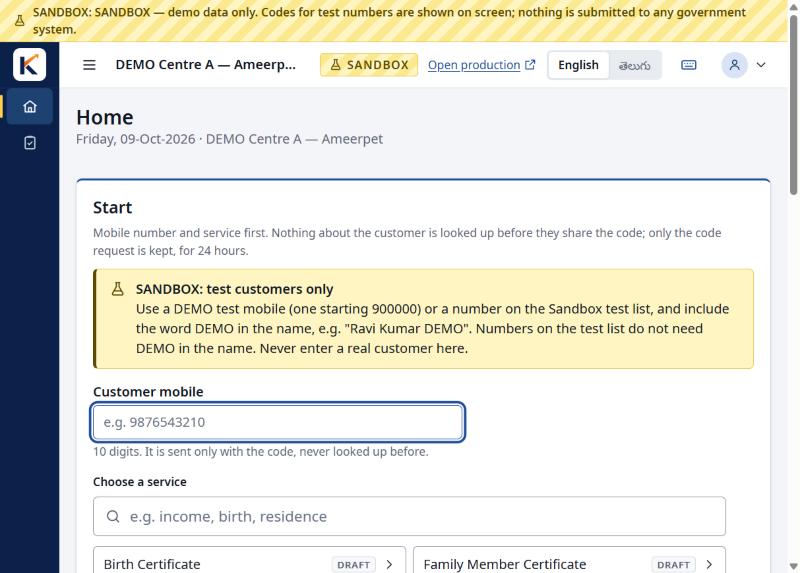
Every application starts the same way: the customer's mobile number and the service they need. Nothing about the customer is looked up before they share the one-time code.
The pilot
We are starting with a small number of service centres in Telangana. Our team sets up KAARYU with you, trains your operators and listens to what works and what does not.
Centres in any state will be able to register online, practise with demo customers, and start a 30-day free trial once approved.
Online registration opens shortly. If the registration page is not open yet, send us an enquiry and we will contact you.
Read more on how we handle your customers' information.